The Four Fundamental Pillars of SEO

TL;DR
- This article covers the essential quartet of search engine optimization including technical health, content quality, link authority, and user experience. You will learn how ai website tools and performance optimization strategies work together to boost rankings. It provides actionable tips for security analysis and accessibility best practices to ensure your site is ready for modern search algorithms.
The technical foundation where it all starts
Ever wonder why some sites just never show up on Google even if the writing is great? It's usually because the "engine" under the hood is totally broken, and if a bot can't crawl you, you don't exist.
Technical SEO is basically just making sure your site is readable for robots, not just humans. Think of it like a map; if the roads are blocked or the signs are missing, nobody—especially not google—is getting to the destination.
First thing you gotta realize is that bots are busy. They have a "crawl budget" and if your site is a mess, they'll just leave. You need to make sure your sitemap is clean and your robots.txt isn't accidentally blocking your most important pages (I've seen this happen way too often in healthcare sites where privacy settings go overboard).
- Sitemap health: Keep it updated so bots know exactly where the new stuff is.
- Broken links: Use standard broken link checkers to scan for 404s. A retail site with dead product links is basically telling Google it’s a graveyard.
- Robots.txt: This is your "keep out" sign. Use it for admin pages, but don't accidentally hide your blog.

According to Google Search Central, crawling is the first step where bots discover your pages before they even think about ranking them. If you fail here, nothing else matters.
Security isn't just for IT geeks anymore; it's a huge ranking signal. (Cybersecurity isn't just for 'tech people' anymore. Here's why.) If your site says "Not Secure" in the browser, people run away, especially on finance or e-commerce sites. To fix this, you need to get an SSL/TLS certificate which moves your site from http to https and encrypts the data.
A 2023 report from Cloudflare notes that encryption is now a baseline requirement for web integrity and user trust.
Common mistakes? Forgetting to renew your certificate or having "mixed content" errors where some images load over http while the page is https. It looks sloppy and hurts your visibility.
Now that we've got the bots actually looking at the site, we need to talk about what they find—which brings us to the actual words on the page.
On-page content and relevance strategies
So, you’ve got the bots crawling your site—great. But if they land on your page and find a "keyword stuffed" mess that looks like it was written by a broken calculator from 1998, you’re still gonna fail.
The biggest mistake I see startup founders make is trying to outsmart the algorithm by repeating the same phrase ten times. Google is way smarter than that now. You need to focus on search intent. If someone searches "best stethoscope for nurses," they want a comparison, not a 5,000-word history of medical tools.
H1 and H2 tags are still the backbone of your page structure. Think of your H1 as the book title and H2s as the chapters. If your H2s don't actually describe what’s in the paragraph, you're confusing both the user and the ai that’s trying to categorize you.
- Natural keyword placement: Put your main term in the first 100 words, but don't force it. If it reads weirdly out loud, delete it.
- Content gaps: I like to look at what the top three results are missing. If a retail site sells "hiking boots" but doesn't mention "ankle support," that’s a gap you can exploit.
- Multimedia alt-text: Don't just name an image "IMG_502.jpg." Describe it for accessibility and seo—like "leather hiking boots on rocky trail."
Most of us don't have the budget to hire a full-time seo agency when we're just starting out. This is where using something like PingUtil comes in handy. It’s a suite of free website diagnostic tools that actually gives you ai-powered insights without making you sign up for a "pro" plan first.
I’ve used their reports to show freelancers exactly where their meta descriptions are too long or where they missed an internal link. It’s basically a shortcut to seeing your site through a robot's eyes.

According to a 2024 report by Backlinko, the "relevance" of your content is still a top-tier ranking factor. It’s not just about having the words; it’s about answering the question better than anyone else.
Once your content is actually good, you need to make sure it loads before the user gets bored and clicks away—which leads us right into the world of speed and performance.
User experience and performance optimization
If you think your site is fast because it loads okay on your office wifi—you’re probably lying to yourself. The truth is, most of your users are on spotty 5G or older phones, and if your page takes more than three seconds to pop up, they’re gone.
Performance isn't just about "speed" anymore; it's about how the page feels while it's loading. Google calls these Core Web Vitals, and they're basically a report card for your site's health.
- LCP (Largest Contentful Paint): This is how long it takes for the biggest thing on your screen—usually a hero image or a big block of text—to show up. Aim for under 2.5 seconds.
- CLS (Cumulative Layout Shift): You ever try to click a link and the page jumps, making you click an ad by mistake? That’s bad CLS. It’s annoying as hell and hurts your ranking.
- INP (Interaction to Next Paint): This is the newest metric for 2024. It measures how fast the page responds when a user actually clicks something. If there's a lag, your score drops.
- Mobile-First is the only way: Since most people browse on phones, google uses the mobile version of your site to decide where you rank. If your desktop site is a 10 but your mobile site is a 4, you're a 4.
Beyond how fast a page loads, UX also encompasses how inclusive the site is for all users, regardless of how they browse. I've seen so many saas founders obsess over fancy animations that look cool but absolutely tank their performance scores. You gotta balance the "pretty" with the "functional."

According to a 2024 page speed study by web.dev, keeping your vitals in the "green" zone directly correlates with lower bounce rates. It’s not just a technical metric; it’s a revenue metric.
Accessibility is often treated like an afterthought, which is honestly pretty shortsighted. If a screen reader can't navigate your checkout page, you're literally leaving money on the table.
A 2023 analysis from WebAIM found that 96.3% of the top one million home pages had detectable accessibility failures.
Most of these are easy fixes. Using proper contrast so people can actually read your text or adding alt-text to images isn't just for seo—it's for basic usability.
- Keyboard Navigation: Can someone get through your site using only the "Tab" key? Try it. If you get stuck in a menu, your code is messy.
- Semantic HTML: Use
<button>for buttons and<a>for links. Don't use a<div>and try to make it act like a button with javascript; it breaks for screen readers.
Once your site is fast and everyone can actually use it, you need to start thinking about the world outside your own domain—which leads us to the power of authority and backlinks.
Authority and the off-page ecosystem
Building your site is like throwing a party. You can have the best snacks and music, but if nobody famous shows up or talks about it, the rest of the neighborhood won't even know it's happening.
Backlinks are basically votes of confidence from other websites. But here is the thing: one link from a huge site like the New York Times is worth way more than a thousand links from some random "link farm" blog. Google sees who you hang out with to decide if you're legit.
I often see folks ignore "unlinked mentions." This is when a blog or news site talks about your startup but forgets to actually link to you. You can find these by using Google Alerts or brand monitoring tools like Brand24 to see who is talking about you. You can literally just email them and ask for the link. It’s the easiest win in seo.
Social signals—like people sharing your stuff on twitter or linkedin—don't directly boost your rank, but they get eyes on your content. More eyes lead to more natural links from writers who actually find your stuff useful.

You don't have to guess what's working anymore. Using ai tools to peek at your competitors' backlink profiles is basically a cheat code. You can see exactly which sites are linking to them and try to get a piece of that action too.
According to Ahrefs, about 90.63% of content gets zero traffic from google. Most of the time, it's because those pages have zero backlinks. If you want to be in that top 10%, you gotta build authority.
A 2024 report by Moz suggests that while the quality of links matters most, having a diverse "link profile" from different types of domains is crucial for long-term safety against algorithm updates.
SEO isn't a "set it and forget it" thing. It’s more like a garden. You gotta keep weeding the technical errors, planting fresh content, and making sure the fence (your authority) stays strong.
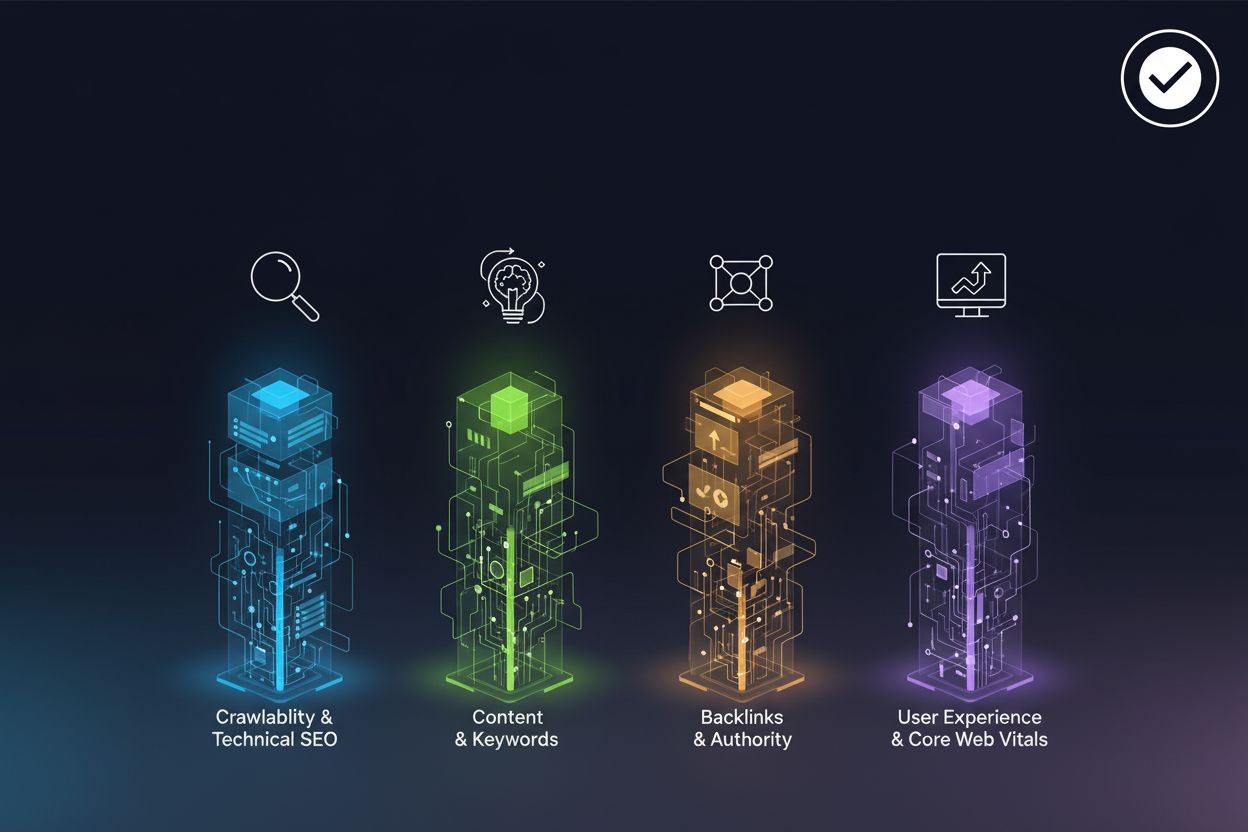
To really win, you need to audit all four areas holistically. Check your technical health (SSL and sitemaps), refine your on-page relevance, optimize for user experience (speed and accessibility), and build your authority through quality links. If you ignore one, the others won't save you. Honestly, just focus on being useful. If your site solves a real problem, the links and the rankings usually follow—eventually. Just don't expect it to happen overnight.